Archify
github.com/tt-a1i/archify- Category
- Developer Tools
- Rank
- No. 681Tools index
Previous survey · No. 675 ·
- Pricing
- Open Source
- Type
- TOOL
- Use case
- Design & Media
- Interfaces
- Agent Skill / Plugin
- Builder
- tt-a1i
- GitHub
- 83.0k stars
- Latest release
- v3.1.0
- Date
About
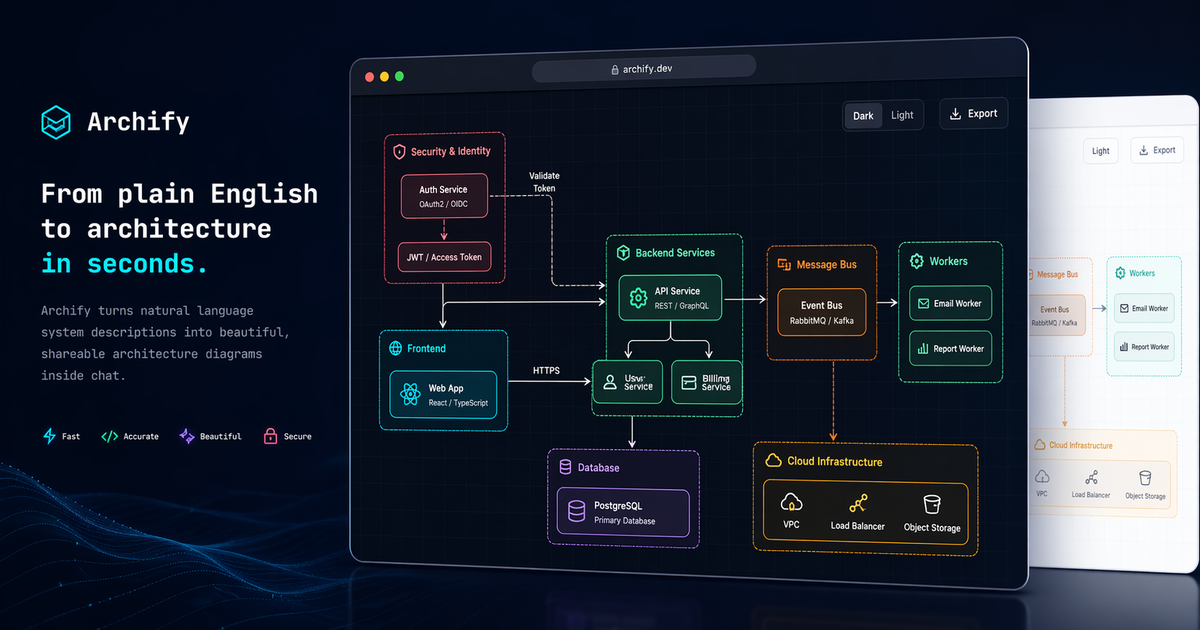
Archify is a Node.js skill for coding agents (Cursor, Claude Code, Codex, OpenCode) that converts plain-English system descriptions or codebase analysis into interactive, validated architecture diagrams. It compiles agent-produced typed JSON into self-contained HTML/SVG with five diagram types, dark/light presets, ultra-crisp exports, and before/after architecture diffs for PR review.
What it does
The assistant a developer is already chatting with produces a small file describing a system, its parts, and how they connect. This tool turns that description into a finished, browsable picture, checking it against a schema first so broken or inconsistent inputs get rejected rather than rendered. Output is one self-contained page, plus optional image and video exports, with a separate command that shows exactly what changed between two versions of the same picture.
Why it's ranked here
The verdict rests on how seriously the project treats correctness rather than just visuals. Before any output ships, structural checks run against a defined schema, duplicate identifiers are rejected, and a delivery command freezes the input and verifies the final file with a hash before replacing anything. That is unusual rigor for a diagramming tool, and it is paired with a permissive open license and a genuine test suite rather than a demo repository dressed up with badges.
What's good
Validation happens at multiple stages: the structure of the input, the layout, the rendered markup, and any authored route between elements, and a candidate is discarded rather than shipped if any stage fails. Comparing two versions of the same picture produces an itemized list of what was added, removed, moved, or rerouted, which is more useful for a pull request than a fresh image with no context. The optional update check is opt-out and deliberately minimal, sending nothing beyond ordinary network metadata.
Tradeoffs
The project is still a pre-release development build, not a finished 1.0, so interfaces described today may shift before a stable release. It only produces diagrams from structured input: a person or an agent still has to author or extract that structure by hand, and the tool explicitly refuses to guess at topology it was not given. Browser-based visual verification also depends on having a Chromium-family browser installed locally.
How to use it well
This fits a workflow where an agent already understands a codebase or a proposed design and needs to hand a reviewer something concrete: a system sketch for a design discussion, a call-by-call diagram for a tricky cache path, or a comparison between two versions of a system map attached to a pull request. It is not a general drawing tool and does not replace freehand diagramming when no structured source of truth exists yet.
Technical notes+
archify/package.json declares the package private with a single bin entry point, requires Node >=18, is MIT licensed, and keeps devDependencies to ajv, parse5, saxes and simple-icons plus a pinned override for fast-uri; its test script chains check:viewer, check:brand-marks, check:validators, check:release-identity, a golden-file test and a shared test runner. archify/renderers/shared/cli.mjs is the shared render pipeline: loadDiagram reads and JSON-parses the input file, then runs validateSchema, validateGuidedViews, validateRelationshipIds and validateEngineeringProfile before verifyRepositoryEvidence and writeDiagram produce the output; validateRelationshipIds and validateGuidedViews both call throwDiagnosticProblems with structured diagnostics on duplicate or unknown IDs instead of failing silently. docs/authoring-cookbook.md documents the CLI surface (doctor, validate, inspect, render, deliver, compare, guide), states that deliver freezes input bytes, renders to a candidate file, and only replaces the target after gates pass with a receipt carrying specification and artifact SHA-256 hashes, and notes that inspect is Architecture-only. README.md and docs/guide.html corroborate the five diagram types and the optional, environment-variable-disableable update-check network call.
Observed
- License
- MIT licensed, per README.md and the license field in archify/package.json.
- Packaging
- Node.js CLI distributed as an ES module package (type: module) requiring Node.js 18 or newer, per archify/package.json.
- CLI entry point
- Single CLI entry point declared via a bin field (archify) in archify/package.json.
- Dependencies
- Dev dependencies limited to ajv, parse5, saxes and simple-icons, with a pinned override for fast-uri, per archify/package.json.
- Distribution
- archify/package.json marks the package private, so it is installed through a skill-installer command rather than published to the public npm registry.
- Test suite
- A test script in archify/package.json runs a dedicated test suite, including a golden-file test and a shared test runner, as part of npm test.
- CLI subcommands
- CLI subcommands documented in docs/authoring-cookbook.md: doctor, validate, inspect, render, deliver, compare, guide; inspect is scoped to Architecture diagrams only.
- Rendering pipeline
- The shared rendering pipeline in archify/renderers/shared/cli.mjs runs schema validation, duplicate-identifier checks and a repository-evidence check before any output file is written.
- Telemetry
- The optional update check can be disabled via an environment variable and is documented as sending no version, agent, project, prompt or account/device identifiers (README.md).
Read from README.md, archify/package.json, archify/renderers/shared/cli.mjs, docs/guide.html, docs/authoring-cookbook.md.
What it can do
Convert plain-English system descriptions or codebase analysis into architecture diagrams
Plain-English system description or codebase analysis → Interactive HTML/SVG architecture diagram
Validate agent-produced typed JSON before rendering
Typed JSON from coding agent → Validation result / checked diagram data
Render diagrams in multiple diagram types
Validated JSON → One of five diagram type layouts
Apply dark/light visual presets to diagrams
Diagram data → Styled HTML diagram (dark or light theme)
Export diagrams in high-resolution crisp format
Diagram data → Ultra-crisp exported image/file
Generate before/after architecture diffs for pull request review
Two versions of architecture JSON → Diff visualization of architecture changes
Tags
Tech Stack
Media
Comments (0)
No comments yet
Editorially curated, with community endorsements as a secondary signal. Corrections welcome.