
Hallmark
github.com/nutlope/hallmark- Category
- Developer Tools
- Rank
- No. 750Tools index
- Listed in
- #1 Remove AI-slop aesthetics
- Pricing
- Open Source
- Type
- TOOL
- Use case
- Design & Media · Software Testing & Quality
- Interfaces
- Agent Skill / Plugin
- Builder
- nutlope
- GitHub
- 29.4k stars
- Date
About
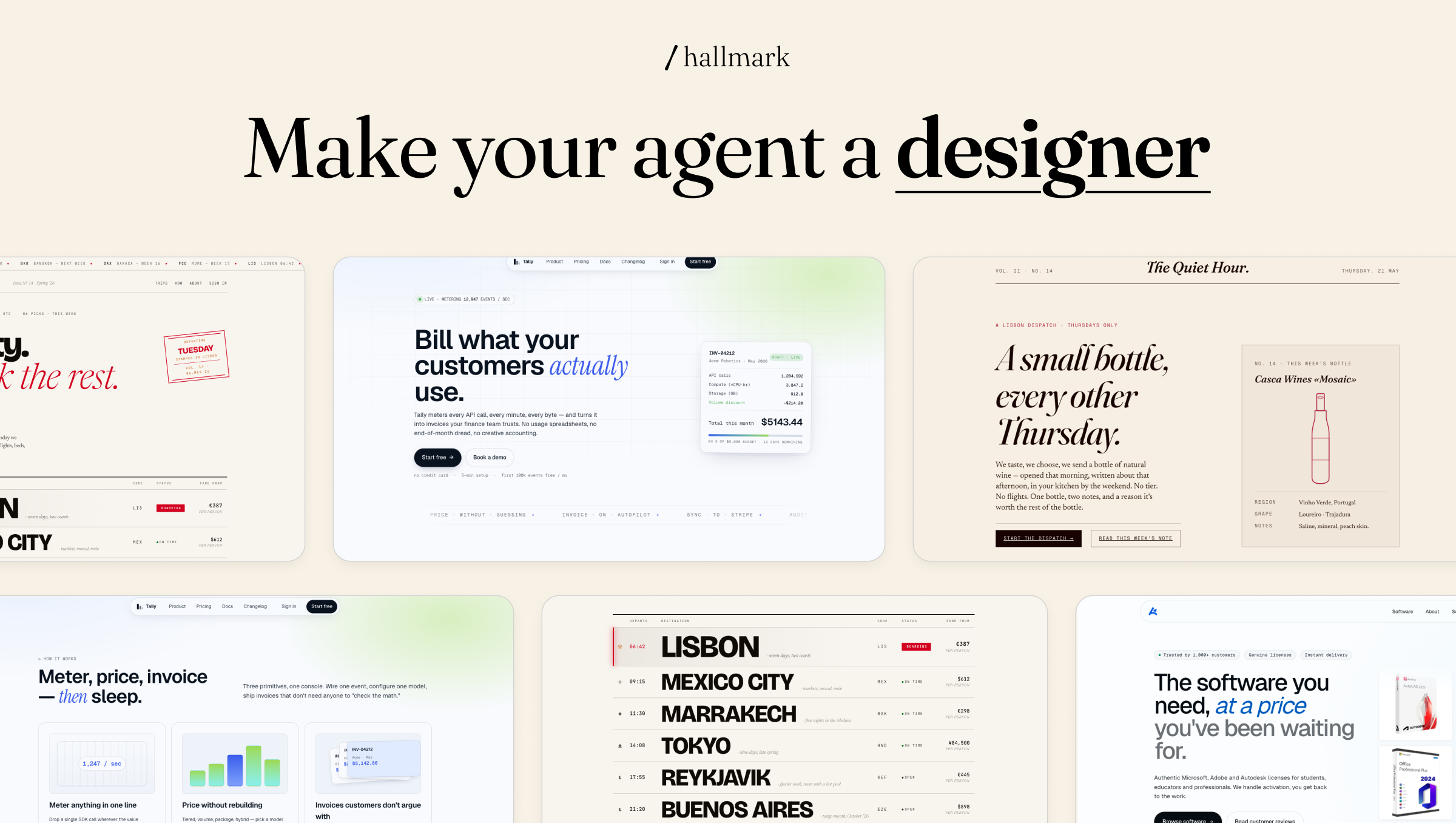
Hallmark is an installable skill for Claude Code, Cursor, and Codex that encodes an anti-slop ruleset against common AI-generated design tells — purple gradients, single-font pages, centered layouts, generic icon cards — running 57 slop-test gates before returning generated UI. It provides four verbs: build new pages from a brief, audit existing code against the anti-pattern catalogue, redesign a page's structure while keeping content, and study a reference design to extract a portable DNA spec.
What it does
Hallmark is not code: a stack of markdown documents a coding assistant loads and follows before handing back a finished page. It documents visual habits that make output look machine made, such as one typeface used everywhere or a saturated two-tone hero background, and pairs each with a fix. Before returning anything, the assistant checks its own draft against a long list of these rules and revises whatever fails. Four modes cover starting a page from a brief, scoring an already-built page against the same rules without touching it, reshaping a page's layout while leaving its wording alone, and reverse-engineering an admired design into a written style guide to reuse.
Why it's ranked here
The rules are specific enough to argue with: each named pattern gets a plain reason it reads as machine made and an exact swap, and one rule forces every color and typeface to route through a named token so nothing gets improvised mid-draft. That specificity is the real asset, not the promise of variety. Everything here is prose the host assistant is trusted to obey, not code that enforces it: no test suite, no linter, no build step checks the output against what it describes. The checklist is the strongest part of the package, with the standing caveat that compliance is only as good as the model reading it.
What's good
The strongest parts are the ones that ban invention rather than dictate taste: no fabricated metrics or testimonials, no color or font value outside a named token, and a hard floor for responsive behavior at four specific screen widths with no horizontal scroll allowed. Each anti-pattern entry explains why the pattern reads as machine made before it prescribes the fix, which teaches rather than just filters. The dispatch logic also tracks what it already built for a project so a second page in the same codebase does not repeat the same structural shape as the first, which is a harder problem than picking one good template.
Tradeoffs
Nothing here is enforced by tooling: the whole mechanism is markdown instructions the host assistant is asked to follow, so a model pulled toward its own training defaults could ignore or partly apply the rules with no error surfaced. There is no automated check that verifies an output actually passed the review it claims; the self-scoring step is a comment the model writes about its own work, not an independent gate. Coverage is narrow by design too: it governs visual and structural choices, not backend logic, and accessibility beyond contrast and mobile width, or performance beyond a couple of named rules.
How to use it well
Point it at a written brief with a real audience, use case, and tone; the more specific the brief, the less the assistant has to guess. Run the audit mode on an existing page first if the goal is fixing a live site, since that mode only returns a punch list and never edits on its own. It suits teams shipping several distinct landing pages who want each to feel like its own site, not a product needing many pages to look like one consistent brand: the tool treats a repeated shape across pages as the failure it exists to prevent.
Technical notes+
skills/hallmark/SKILL.md is the frontmatter-declared entry point (name: hallmark) and defines the four verbs plus a six-axis pre-emit self-critique that gets stamped as a CSS comment on the artifact; it also carries a component-scope branch that skips macrostructure, nav, and footer steps for single-element requests. The rule bodies live in separate reference files SKILL.md defers to rather than inlines: skills/hallmark/references/anti-patterns.md documents each named tell (purple-gradient heroes, gradient-clip headline text, the eyebrow-label pattern) with its own numbered gate, and skills/hallmark/references/color.md mandates OKLCH values routed through CSS custom properties, banning pure #000/#fff and capping accent color to a small share of any view. skills/hallmark/references/assets.md defines a tiered placeholder-image strategy with a required swap-in HTML comment and a single CSS constant for the base URL. package.json declares the package as type module, scopes its files field to the skills directory, lists skill.harnesses as claude-code, cursor, and codex, and its only script (serve) launches a static http.server for the demo gallery driven by site/js/main.js, a dependency-free vanilla-JS file that swaps a hardcoded THEMES/COPY object per theme with no build step. README.md and docs/recipes.md describe the same install path (npx or manual copy into a harness-specific skill directory) and a set of worked example prompts; ROADMAP.md lists unbuilt items (an automated image-generation hook, a variant verb, multi-page brand coherence) explicitly as future work, not present functionality.
Observed
- License
- License: MIT (README.md, package.json)
- Packaging
- Distributed as a skill for three specific AI coding assistants (package.json skill.harnesses: claude-code, cursor, codex), not as a standalone CLI or library
- Install surface
- Install surface: npx package install, or manual copy of skills/hallmark/SKILL.md and its references directory into a harness-specific skill folder (README.md)
- Dependencies
- No runtime dependencies declared in package.json; the only script runs a static file server for the example site
- Interfaces
- Interface is natural-language verbs invoked inside the host assistant (default build, audit, redesign, study), not a programmatic API or CLI binary
- Demo gallery
- Repository also ships a static demo gallery (site/js/main.js) implemented in plain JavaScript with no framework or build tooling
- Design rules
- Rule set mandates OKLCH color values and forbids inline color or font-family declarations outside a named CSS custom-property token (skills/hallmark/references/color.md)
Read from README.md, package.json, site/js/main.js, skills/hallmark/SKILL.md, skills/hallmark/references/anti-patterns.md, skills/hallmark/references/assets.md, skills/hallmark/references/color.md, docs/recipes.md, ROADMAP.md.
What it can do
Build new UI pages from a text brief, checked against anti-slop gates
Design brief text → Generated UI page
Audit existing code against the anti-pattern catalogue
Existing code → Audit report of design anti-patterns
Redesign a page's structure while keeping its content
Existing page code/content → Redesigned page structure
Study a reference design to extract a portable DNA spec
Reference design → Portable design DNA spec
Tags
Tech Stack
Media
Comments (0)
No comments yet
Editorially curated, with community endorsements as a secondary signal. Corrections welcome.