Codex usage reset after a round of quota-burning fixes
- Source
- x.com
- Date

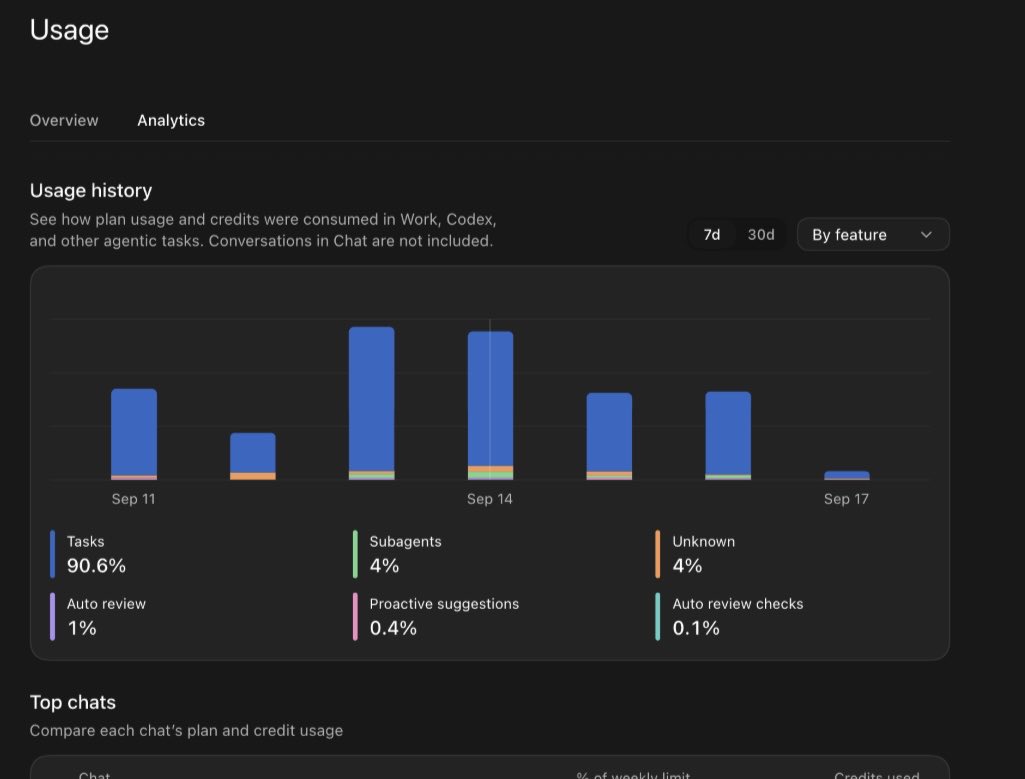
We are reseting usage for all paid users of Codex and ChatGPT Work. Please continue reading for an update on Codex usage limits. The team has been working around the clock, going through thousands of reports and shipping fixes. Depending on how you use Codex, you should see your usage go between 10% and 50% further than before. We really went with a fine comb, with many uncovered small things being longstanding and here is what we found and fixed: - Compaction. We were keeping old images during compaction, sometimes making the context large enough to trigger compaction again. After the fix, usage dropped around 10% for users making heavy use of images. Fixed. - Memory. Background memory workers could inherit Stop hooks and keep running when the hook wouldn’t let them finish. This affected fewer than 1% of users, with the long tail being pretty bad and we saw one example thread check whether it could stop 15,000 times. Fixed. - Goals. In some cases, a set /goal could finish and then keep going past the intended stop condition, or the model would keep retrying broken tools without stopping. We saw examples consume anywhere from 15% to 70% of a weekly allowance. Fixed. -…
Lists the specific behaviors that quietly burned Codex allowances, such as /goal running past its stop condition (15% to 70% of a weekly allowance) and subagents escalating to costlier models. These are patterns to check in any long-running coding setup.
- context compaction — Summarizing an agent's earlier conversation to free room in the context window so a long session can keep going.
- agent hook — A script the harness runs automatically at a fixed point in an agent's loop — before a tool call, after an edit, on session start.
- multi-agent — Using several AI agents on one problem — splitting work in parallel, checking each other, or filling different roles like planner and reviewer.
- AI agent — An AI system that doesn't just answer once but works toward a goal in a loop — taking actions, reading the results, and deciding what to do next.

Checking sign-in…
Loading comments…