- Category
- Developer Tools
- Rank
- No. 1183Tools index
Previous survey · No. 1192 ·
- Pricing
- Open Source
- Type
- APP
- Use case
- Coding
- Interfaces
- Desktop
- Builder
- @steipete
- GitHub
- 748 stars
- Latest release
- v0.11.5
- Date
About
A macOS menu bar utility that automatically flattens multi-line shell commands from your clipboard so they paste and run correctly in terminals. It removes newlines while preserving line continuations and strips shell prompts, making it easier to copy commands from documentation and tutorials.
What it does
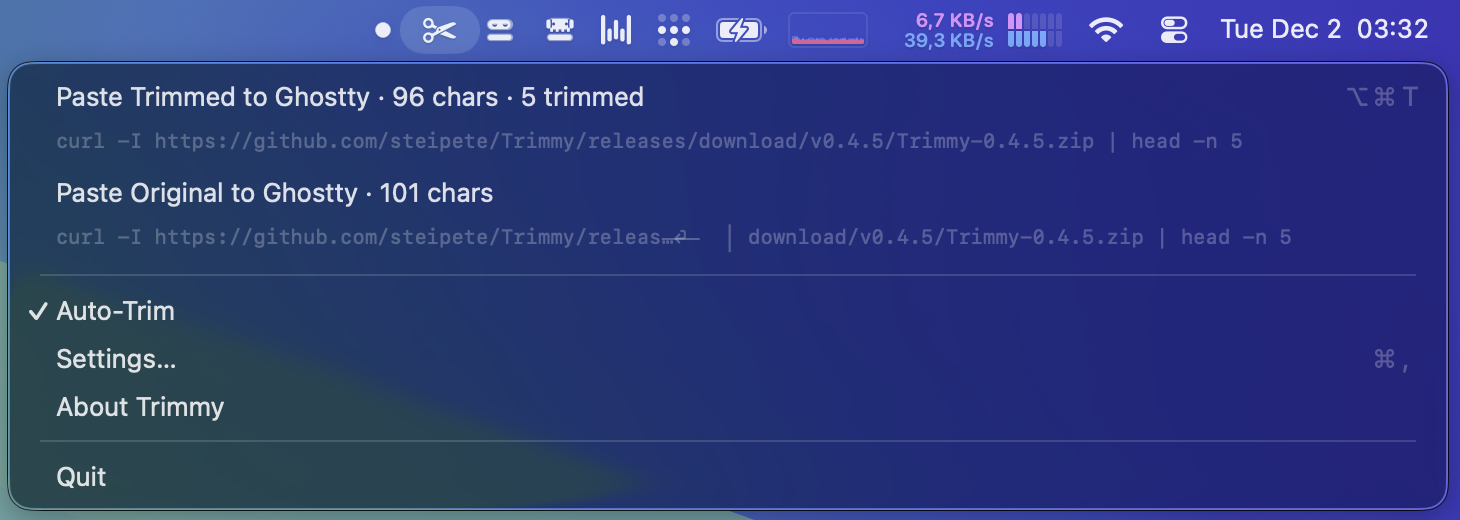
Trimmy classifies clipboard text using shell-like cues, then applies a chosen sensitivity profile before the next paste. It keeps access to the untouched copy and previews changes. Its menu also offers focused cleanup for hard-wrapped Markdown, tracking-heavy URLs, and copied terminal output with box-drawing gutters.
Why it's ranked here
The case for Trimmy is strong because it combines cautious detection with practical escape hatches. Terminal and general-app profiles can differ, specific apps and sites can be excluded, and the original remains available. The shared command-line engine also makes the same cleanup useful in scripts and CI.
What's good
The controls match the risk of rewriting clipboard contents. Low sensitivity requires strong command signals, while manual trimming can apply the most aggressive mode. Clipboard data stays local, self-written content is marked to prevent processing loops, and automatic rewriting works without Accessibility permission. Tests cover both the app and command-line targets.
Tradeoffs
The packaged desktop app requires an Apple silicon Mac running macOS 15 or later. Global paste actions require Accessibility permission, though background clipboard rewriting does not. Heuristic classification still demands sensible sensitivity settings and exclusions, and large clipboard payloads are deliberately skipped. Manual testing notes also record runs where automatic trimming did not activate consistently.
How to use it well
It suits people who frequently move commands from documentation, chat, or terminal transcripts into a shell. Start with conservative sensitivity, keep terminal handling separate, and exclude apps or sites where formatting must remain exact. Use the command-line interface for files and pipelines. It reshapes text; it does not verify that a command is correct or safe to execute.
Technical notes+
Package.swift defines Swift 6.2 targets for TrimmyCore, the macOS executable, TrimmyCLI, and two test targets, with strict concurrency enabled. The app depends on Sparkle, KeyboardShortcuts, and MenuBarExtraAccess, while the CLI depends only on TrimmyCore. Sources/TrimmyCLI/main.swift reads files or stdin, supports plain-text and JSON output, and returns distinct exit codes for input failure, unchanged content, and JSON failure. docs/spec.md describes NSPasteboard polling through a DispatchSourceTimer, an approximately 80 ms deferred read, and the com.steipete.trimmy self-write marker. docs/manual-testing-peekaboo.md contains both successful clipboard transformations and later runs where automatic trimming remained inactive.
Observed
- License
- MIT
- Primary language
- Swift
- Packaging
- Homebrew Cask and signed GitHub release app; the app can install a bundled command-line helper.
- Interfaces
- macOS menu-bar application and headless command-line interface; no library, API, or MCP interface is described.
- Platform support
- The desktop application requires Apple silicon and macOS 15 or later; Linux command-line binaries are distributed through GitHub Releases.
- Test structure
- The Swift package declares separate test targets for the application and command-line interface.
Read from README.md, package.json, docs/cli.md, docs/icon.md, docs/spec.md, docs/AGENTS.md, docs/release.md, docs/debug-lldb.md, docs/preferences-panel.md, docs/releasing-homebrew.md, docs/manual-testing-peekaboo.md, Package.swift, Scripts/docs-list.mjs, Scripts/generate-llms.mjs, Sources/TrimmyCLI/main.swift.
What it can do
Automatically flatten multi-line shell commands
Multi-line shell command text in clipboard → Single-line shell command ready for terminal execution
Remove newlines while preserving line continuations
Shell command with backslash line continuations → Properly formatted command with preserved continuations
Strip shell prompts from copied commands
Command text with shell prompts (e.g., $, #, >) → Clean command text without prompts
Watch clipboard for shell commands automatically
Any text copied to macOS clipboard → Processed command text when shell commands detected
Configure processing aggressiveness levels
User preference settings → Adjusted command processing behavior for different contexts
Tags
Tech Stack
Media
Comments (0)
No comments yet
Editorially curated, with community endorsements as a secondary signal. Corrections welcome.