WhyFi
whyfi.network- Category
- Productivity
- Rank
- No. 1692Tools index
- Pricing
- Paid
- Type
- APP
- Use case
- Deployment & Operations
- Interfaces
- Desktop
- Date
About
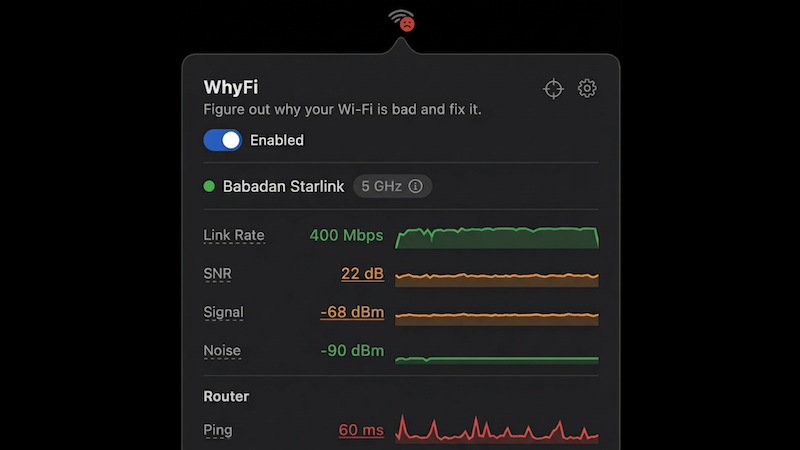
A macOS menu bar app that continuously monitors your Wi-Fi connection and diagnoses exactly what's causing slow internet speeds. It identifies whether issues stem from Wi-Fi signal, router, ISP, or DNS problems and provides actionable fixes.
What it does
The site presents WhyFi as a macOS menu bar app tracking Wi-Fi signal, router latency, internet quality, and DNS, with green, orange, or red status per layer. It adds a real-time signal radar, a speed test with bufferbloat detection, a channel scanner, and one-click DNS switching to Google or Cloudflare.
Stated on the product site
- Price
- $10 one-time license
- Platform requirement
- macOS 13+, Apple Silicon and Intel
- Interface
- Menu bar app
- Monitored dimensions
- Signal strength, noise floor, SNR, transmit rate, router ping, internet ping, jitter, DNS lookup time
- Sale proceeds
- Donated to a Bali street animal charity
Not stated on the site
- Whether a free trial is offered before the $10 purchase is not stated on the page.
- The page names only macOS 13+ as a requirement, so whether any Windows or Linux version exists is an open question.
- How the exported diagnostic report is formatted, beyond pasting it into a chat assistant, is not described.
Written from the product site at whyfi.network.
What it can do
Monitor Wi-Fi connection status
Wi-Fi network connection → Real-time connection status data
Diagnose internet speed issues
Network performance data → Specific problem identification (Wi-Fi signal, router, ISP, or DNS)
Test Wi-Fi signal strength
Current Wi-Fi connection → Signal strength measurements and analysis
Analyze router performance
Router connection data → Router-specific issue diagnosis
Test ISP connection quality
Internet service provider connection → ISP performance analysis and bottleneck identification
Diagnose DNS problems
DNS server responses → DNS-related issue detection and analysis
Provide actionable fix recommendations
Diagnosed network problems → Step-by-step solutions for identified issues
Tags
Media
Comments (0)
No comments yet
Editorially curated, with community endorsements as a secondary signal. Corrections welcome.