Superset
superset.sh- Category
- AI Agents
- Rank
- No. 231Tools index
- Pricing
- Open Source
- Type
- APP
- Use case
- Coding
- Interfaces
- Desktop · MCP · API
- Builder
- superset-sh
- GitHub
- 15.8k stars
- Latest release
- desktop-canary
- Date
About
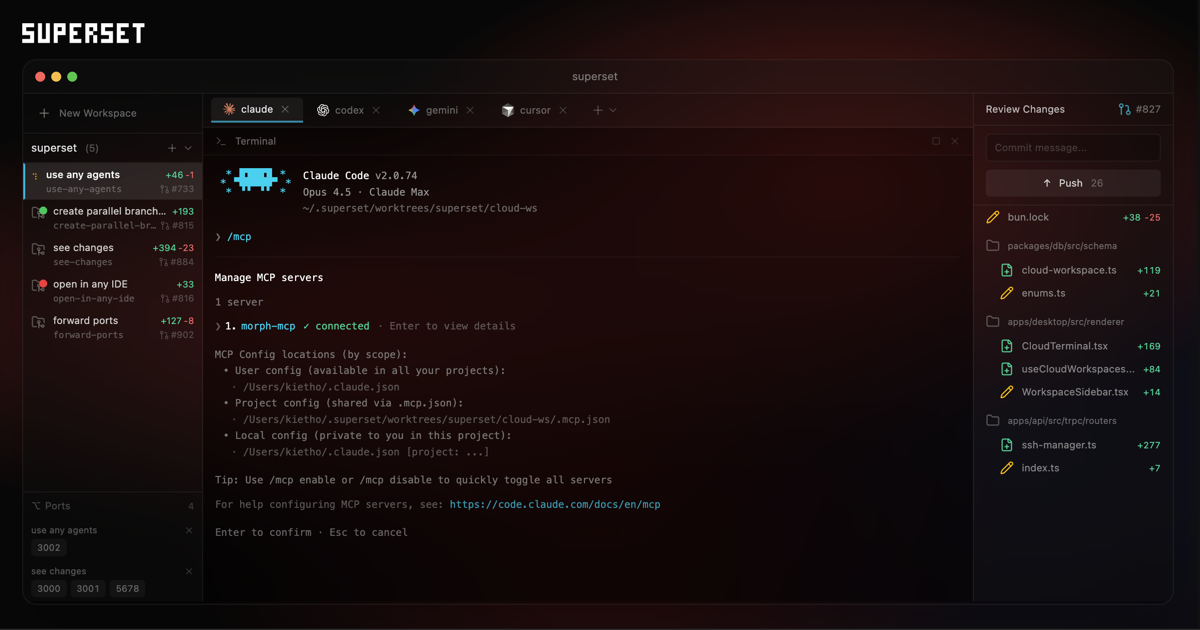
A code editor that lets you run 10+ parallel AI coding agents simultaneously on your machine. Works with Claude Code, Cursor, OpenCode and other CLI-based coding tools, with each agent running in isolated Git worktrees to prevent conflicts.
What it does
Superset turns agent sessions into managed development workspaces. It tracks progress, preserves terminal sessions, previews running applications, and lets you inspect, edit, commit, and push changes from the same interface. Scheduled automations and remote access extend that workflow beyond an active desktop session.
Why it's ranked here
The case for Superset is strong because it covers the full agent workflow, not merely launch and monitoring. Terminal persistence, workspace setup scripts, per-workspace previews, direct diff editing, notifications, automation, and editor handoff address the practical coordination costs that appear once several agents are active.
What's good
Git worktrees give every task its own branch, terminal, environment, and preview port. The built-in diff view supports comments and edits before commit or push. Persistent terminal sessions survive restarts. The CLI, generated SDK, and MCP interface also make workspace and automation control available to scripts and agents.
Tradeoffs
The documented desktop download targets macOS, although remote hosts broaden where work can run. Superset also introduces a substantial operating layer: cloud authentication, organizations, local and hosted databases, terminal daemons, provider credentials, and background services. Generic terminal agents work, but richer launch controls depend on explicit agent support.
How to use it well
Use Superset when several independent coding tasks can proceed concurrently and each result still needs human review. Add setup scripts and terminal presets so workspaces start consistently, then compare or merge the useful branches. It does not supply the coding agent or model itself, so bring those providers and credentials separately.
Technical notes+
The root package.json defines a private Bun workspace monorepo across apps/*, packages/*, and tooling/*, with Turbo coordinating builds, tests, linting, and type checks. packages/sdk/src/index.ts exposes a Stainless-generated OpenAPI client covering agents, automations, hosts, projects, tasks, terminals, and workspaces. packages/mcp/src/server.ts builds an MCP server with registered tools and host-scoped identifiers. packages/host-service/src/app.ts assembles Hono, tRPC, WebSocket routes, Git watching, SQLite persistence, terminal bindings, pull-request synchronization, and chat runtimes. packages/pty-daemon/src/main.ts manages persistent PTY sessions through Unix sockets and supports process handoff during daemon upgrades. packages/macos-process-metrics/index.js loads native macOS memory metrics and returns an empty result when unavailable.
Observed
- License
- Elastic License 2.0
- Primary language
- TypeScript across the sampled application and package sources
- Repository packaging
- Private Bun workspace monorepo managed with Turbo
- Install surface
- Downloadable macOS desktop application plus a single-binary CLI
- Interfaces
- Desktop interface, CLI, generated TypeScript SDK, MCP server, and remote access
- Agent compatibility
- Named integrations for many coding agents, with generic CLI agents supported without configuration
- Platform behavior
- The README advertises macOS download; native process metrics fall back gracefully outside macOS
Read from README.md, package.json, packages/macos-process-metrics/index.js, packages/db/src/index.ts, packages/mcp/src/index.ts, packages/sdk/src/index.ts, packages/mcp/src/server.ts, packages/trpc/src/index.ts, packages/auth/src/server.ts, packages/panes/src/index.ts, packages/local-db/src/index.ts, packages/pty-daemon/src/main.ts, packages/host-service/src/app.ts, packages/pty-daemon/src/index.ts, packages/host-client/src/index.ts.
What it can do
Run multiple AI coding agents simultaneously
Code projects and AI agent configurations → Parallel code generation and editing across multiple agents
Isolate AI agents in separate Git worktrees
Git repository and multiple coding tasks → Conflict-free parallel development environments
Integrate with Claude Code for AI-assisted coding
Code files and natural language prompts → AI-generated code suggestions and modifications
Integrate with Cursor for intelligent code editing
Source code and editing commands → Enhanced code with AI-powered improvements
Integrate with OpenCode CLI tools
Code projects and CLI commands → Processed code through OpenCode functionality
Manage multiple CLI-based coding tools simultaneously
Various CLI coding tool configurations → Coordinated execution of multiple development tools
Prevent conflicts between concurrent coding agents
Multiple simultaneous coding operations → Clean, conflict-free code changes across agents
Tags
Tech Stack
Media
Comments (0)
No comments yet
Editorially curated, with community endorsements as a secondary signal. Corrections welcome.