Sentry Unity SDK
https://github.com/getsentry/sentry-unity- Category
- Developer Tools
- Rank
- No. 414Tools index
- Pricing
- Open Source
- Type
- TOOL
- Use case
- Deployment & Operations
- Interfaces
- SDK
- Builder
- getsentry
- GitHub
- 295 stars
- Latest release
- 4.11.0
- Date
About
Official Sentry SDK for Unity — crash reporting, error monitoring, and performance tracing for Unity games.
What it does
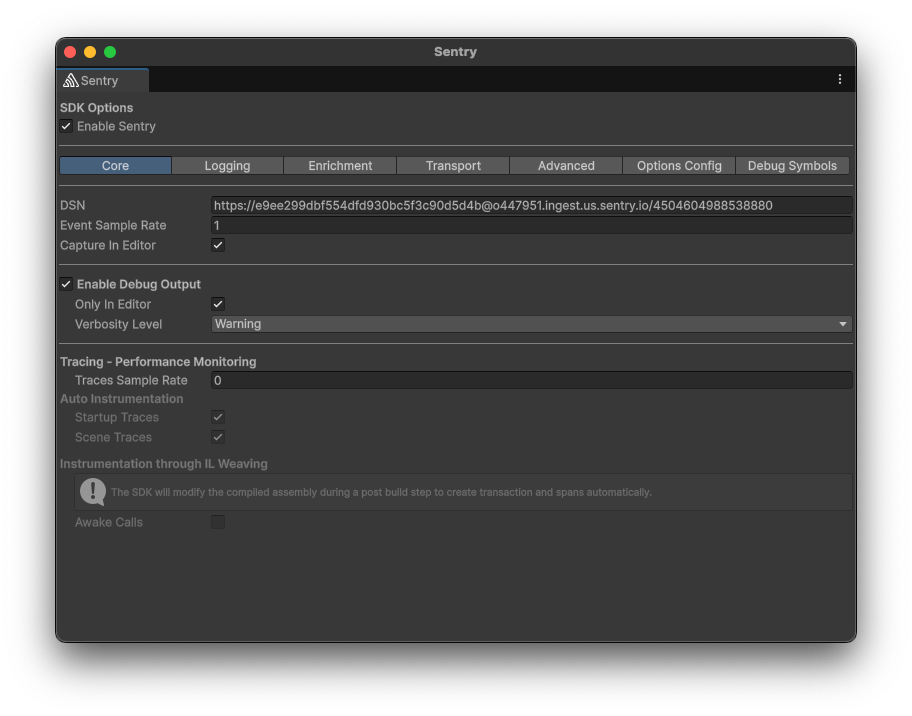
It embeds Sentry into Unity’s managed and native layers, captures exceptions and engine logs, tracks startup and scenes, and synchronizes context across platform SDKs. Editor tooling configures options, symbol uploads, build exports, and optional post-build instrumentation.
Why it's ranked here
This is a strong choice for teams shipping Unity across several targets. It handles Unity lifecycle details, native crash backends, build exports, symbols, and platform context instead of stopping at managed exceptions. The extensive runtime, editor, native, and integration test areas strengthen the case.
What's good
Platform work is unusually thorough. Android, Apple, desktop, WebGL, and consoles receive distinct initialization and build handling. Native events retain synchronized scope, context, breadcrumbs, and debug images. The package also checks dependency coexistence through assembly aliasing and a dedicated conflict fixture.
Tradeoffs
Several capabilities carry sharp constraints. Android native support requires IL2CPP. macOS defaults to an IL2CPP-only Cocoa backend, while its alternative is experimental. Console libraries are user-supplied. Scene tracing replaces a global Unity customization point. Screenshot and view hierarchy capture require the main thread, and some hang detectors can duplicate reports.
How to use it well
Use it for maintained Unity games that need one observability path across managed code, native crashes, exported builds, and debug symbols. Test configuration against every shipping backend and choose experimental features deliberately. It does not supply console native libraries, support older Unity releases, or replace gameplay analytics and product telemetry.
Technical notes+
The package targets netstandard2.0 by default and netstandard2.1 for newer Unity lines, as documented in docs/agent-guides/build.md. docs/agent-guides/integrations.md describes initialization timing, log interception, startup and scene tracing, native-context synchronization, and main-thread capture constraints. Platform bridges and backend behavior are split across docs/agent-guides/platform-android.md, docs/agent-guides/platform-apple.md, and docs/agent-guides/platform-native.md. docs/agent-guides/editor.md documents IL2CPP source mapping, WebGL exception checks, Android export callbacks, symbol handling, and opt-in IL rewriting. docs/agent-guides/packaging.md describes assembly aliasing, UPM staging, release overlays, zip creation, and package-content validation. docs/agent-guides/testing.md lists runtime, editor, Android, Cocoa, iOS export, and cross-platform integration suites.
Observed
- License
- MIT License
- Install surface
- Unity Package Manager package installed from a Git repository URL
- Interface
- Unity runtime library with Editor configuration and build integration
- Unity support
- Tested with Unity 2020.3 onward; older supported line ends with SDK major version 3
- Platform support
- Android, iOS, macOS, Windows, Linux, WebGL, Xbox, PS5, and Switch are covered by platform-specific code or build paths
- Managed targets
- netstandard2.0 by default; netstandard2.1 for Unity 2022 and Unity 6000 lines
- Packaging
- Generated UPM staging package and zip, with release overlay and package-content validation
- Test structure
- Separate runtime, Editor, Android, Cocoa, iOS export, native post-build, and cross-platform integration test areas
Read from README.md, docs/agent-guides/ci.md, docs/agent-guides/build.md, docs/agent-guides/editor.md, docs/agent-guides/testing.md, docs/agent-guides/packaging.md, docs/agent-guides/integrations.md, docs/agent-guides/platform-apple.md, docs/agent-guides/platform-native.md, docs/agent-guides/platform-android.md, AGENTS.md, .craft.yml, LICENSE.md, global.json, CHANGELOG.md.
What it can do
Report application crashes
Unity application crash data → Crash reports with stack traces and context
Monitor runtime errors
Application exceptions and errors → Error reports with debugging information
Trace application performance
Unity game execution metrics → Performance data and timing measurements
Capture user context during errors
User session data and application state → Contextual information attached to error reports
Track release health metrics
Unity application deployment data → Release adoption and stability metrics
Send real-time alerts
Critical errors and performance issues → Notifications to development teams
Tags
Tech Stack
Media
Comments (0)
No comments yet
Editorially curated, with community endorsements as a secondary signal. Corrections welcome.