Apache Superset
github.com/apache/superset- Category
- Developer Tools
- Rank
- No. 55Tools index
- Pricing
- Open Source
- Type
- APP
- Use case
- Data Processing
- Interfaces
- Web
- Builder
- apache
- GitHub
- 75.3k stars
- Latest release
- 7.0.0rc2
- Date
About
A modern, enterprise-ready business intelligence web application that provides no-code chart building, a powerful SQL editor, and beautiful data visualizations. Supports nearly any SQL database and offers a lightweight semantic layer for defining custom dimensions and metrics.
What it does
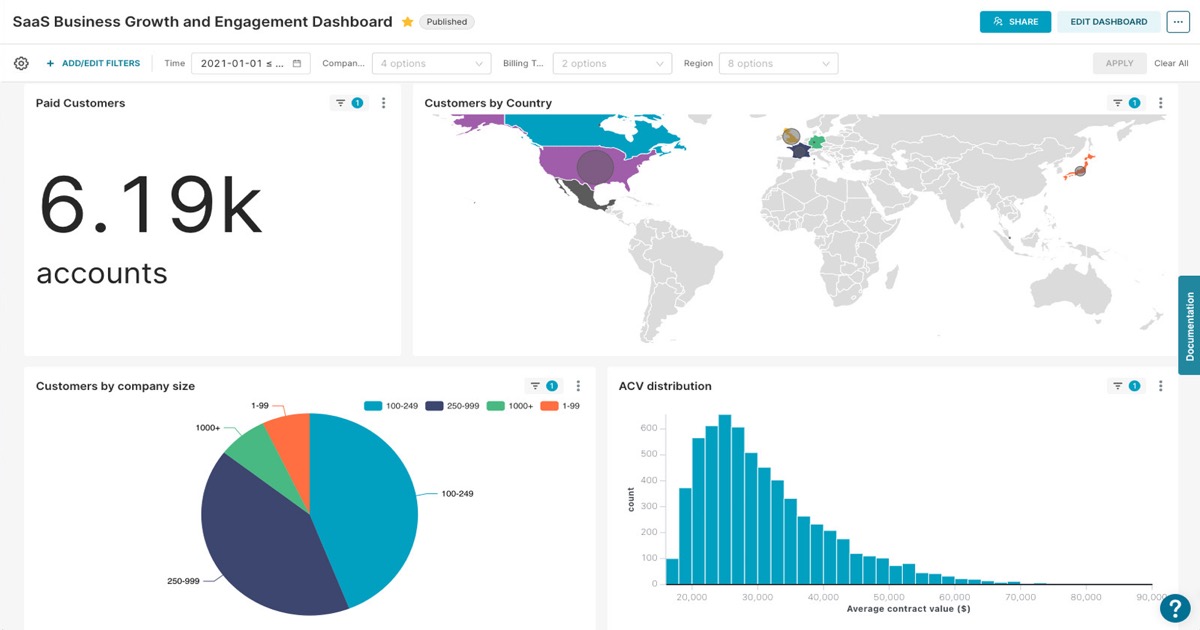
Superset sits between people and existing SQL-speaking data systems. Users connect a source, explore its data in a browser, turn results into charts, and assemble dashboards. Analysts can work visually, while SQL-fluent users can query directly. Shared definitions, caching, access controls, authentication, and an API support team operation.
Why it's ranked here
The strongest case is breadth backed by a clear integration contract. A source works when it has a Python database driver and SQLAlchemy dialect, and the project lists many optional connectors. The browser workflow serves both business users and advanced query authors. That reach comes with meaningful deployment and dependency management.
What's good
It combines visual exploration and direct SQL without forcing every user into one workflow. The visualization range extends from basic bars to geospatial displays. Configurable caching can reduce pressure on source databases. Extensible roles and authentication address shared deployments, while the API and extension framework leave room for programmatic customization.
Tradeoffs
Database breadth depends on external drivers and dialects, so connector quality and compatibility are not entirely under Superset's control. Several optional connectors carry tight version caps because their ecosystems differ on SQLAlchemy support. Development setup spans Python and Node packages, metadata migrations, role initialization, and separate frontend and backend processes. Operators must also configure security and caching.
How to use it well
Choose it for teams that already keep analytical data in SQL-speaking systems and need a shared browser workspace for exploration, queries, charts, and dashboards. Let analysts use visual controls while experienced users handle SQL and reusable definitions. Budget administrator ownership for drivers, authentication, permissions, caching, upgrades, and scaling. It does not replace the source data engine or required connector driver.
Technical notes+
pyproject.toml defines the apache_superset package for Python 3.11 or newer, a setuptools build, substantial Flask, SQLAlchemy, Celery, Redis, and data-processing dependencies, plus database-specific extras and an optional fastmcp extra. setup.py registers the superset console script at superset.cli.main:superset and adds SQLAlchemy dialect aliases. Makefile shows editable installation through uv, metadata migration, role initialization, example loading, npm installation under superset-frontend, separate Flask and frontend development servers, Celery worker targets, and Docker Compose wrappers. superset/app.py constructs a Flask application, loads overridable configuration, initializes extensions, wraps the WSGI application with cache and path middleware, checks Alembic migration state, and conditionally starts a local extension watcher in debug mode. docs/README.md describes a Docusaurus 3 documentation site with independently versioned user, administrator, developer, and component sections.
Observed
- License
- Apache License 2.0
- Implementation
- Python Flask backend with a React and TypeScript frontend
- Package
- Published as the apache_superset Python package using setuptools
- Runtime
- Requires Python 3.11 or newer; project classifiers include Python 3.11 and 3.12
- Interfaces
- Browser application, SQL editor, REST API, extension framework, and superset CLI
- Deployment surfaces
- Documentation covers Docker, Kubernetes, and PyPI installation
- Database integration
- SQL-speaking sources require a Python DB-API driver and SQLAlchemy dialect
Read from README.md, Makefile, setup.py, pyproject.toml, docs/README.md, docs/DOCS_CLAUDE.md, docs/admin_docs/index.md, docs/components/index.md, docs/developer_docs/index.md, docs/admin_docs_versioned_docs/version-6.1.0/index.md, docs/components_versioned_docs/version-6.1.0/index.md, docs/developer_docs_versioned_docs/version-6.1.0/index.md, superset/app.py, docs/sidebars.js, scripts/__init__.py.
What it can do
Build charts without coding
Database connection and data selection → Interactive charts and visualizations
Execute SQL queries
SQL commands and database connection → Query results and data tables
Create interactive dashboards
Charts, filters, and layout configuration → Web-based dashboard with multiple visualizations
Connect to SQL databases
Database credentials and connection parameters → Established database connection for data access
Define custom metrics and dimensions
Business logic and calculation rules → Semantic layer with reusable metrics
Explore and analyze data
Dataset and filter criteria → Data insights and statistical summaries
Tags
Tech Stack
Media
Comments (0)
No comments yet
Editorially curated, with community endorsements as a secondary signal. Corrections welcome.