Kayla Cinnamon is a senior developer advocate at Microsoft and a former product manager for Windows Terminal, PowerToys and Windows developer experiences. Her current tutorials explain how to operate coding agents and review their work across the Copilot app and Visual Studio Code.[1][2]
Start with How to continue a GitHub Copilot app session in VS Code →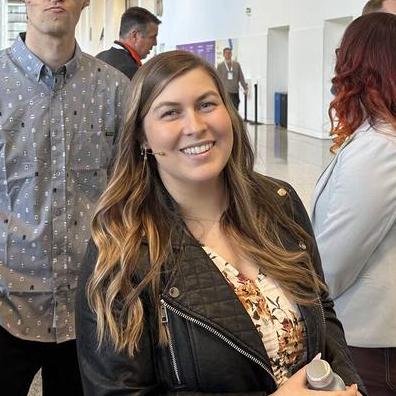
Education

MS in Information Technology, concentration in Human-Computer Interaction
[5]Links
 GitHub
 X Bluesky Mastodon YouTube
Senior Developer Advocate · Microsoft
Background
Her 2020 RunAsRadio guest biography records an MS in Information Technology from Rensselaer Polytechnic Institute, concentrating in Human-Computer Interaction. The conversation discusses Windows Terminal’s separate application model: preserving the behavior existing command-line software depends on while improving the interface around it. That is a product-design context, not a claim that she wrote the terminal implementation alone.[5]
Career
Cinnamon managed Windows Terminal and Cascadia Code before moving into broader Windows developer experiences and developer advocacy. In an October 2022 message to the Terminal community, she explicitly stepped down as its product manager while remaining at Microsoft. Her current GitHub profile names the advocacy role and marks the earlier product-management work as former.[1][4]
Contributions
Parallel sessions with separate working trees
Her September 2026 Copilot guide explains how independent agent sessions can each use a Git worktree, a separate checkout sharing the repository’s history. It walks through several tasks and their session cards so a developer can follow and review results separately. The tutorial’s contribution is operational guidance about isolation and context, rather than a guarantee that concurrent changes never conflict when integrated.[2]
Keeping the conversation when moving to an editor
Her October 2026 guide shows opening an existing Copilot app session in VS Code with its worktree, conversation and changes intact. It then walks through diff review, manual edits, local testing and pushing the updated branch. This connects automated work to the developer’s existing review tools without reconstructing the session from a fresh chat.[3]
Tools, writing & talks
Writing, research & talks
Start here
A guide to carrying an agent session into an editor for review, manual changes and testing.
Start here if you already use VS Code and Git and have a Copilot app session to review. The prerequisites make clear which accounts and repository access are needed.
Author[3]Original sourceGitHub explains Copilot app canvases: agent-editable interfaces like kanban boards or dashboards built from a plain-English /create-canvas prompt, with the agent updating the UI live as it works instead of a fixed screen set.
Catalog workOriginal sourceGitHub walks through the Copilot app's diff, terminal, and browser panels, showing how to review an agent's code changes, run project commands, and check rendered output without leaving the app, closing the review loop for people new to agentic coding.
Catalog workOriginal sourceA walkthrough of independent sessions, working trees and task review in the Copilot app.
Author[2]Original source- Windows Terminal 1.0 with Kayla Cinnamonrunasradio.com
A 2020 conversation about Windows Terminal’s design and compatibility constraints.
Interview guest[5]