Turn artifacts into Mac and Windows apps
- Source
- claude.com
- Author
- Anthropic
- Date
Context
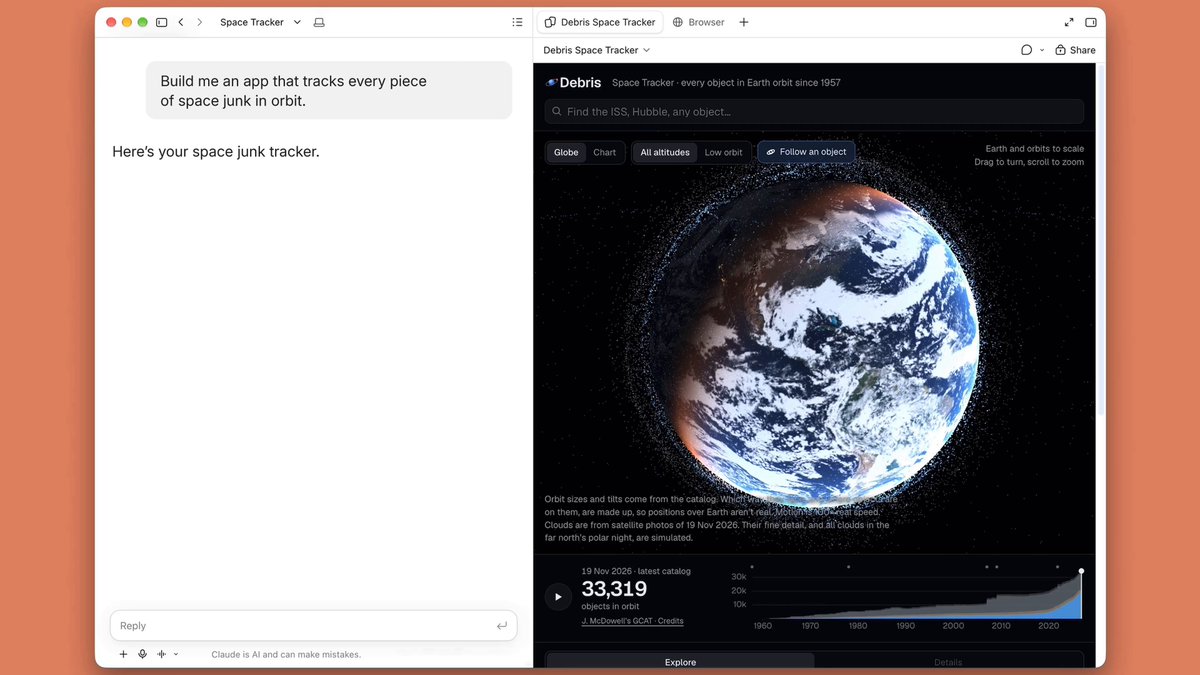
Anthropic wants artifacts, the pages and small programs Claude builds in a chat, to become software people keep on their computers rather than output they hand to someone else. Its announcement of Install as app, a beta in Claude for Mac and Windows, makes that case directly. Artifacts started as things you would share, such as a chart or a webpage, but the post says people now use them as everyday tools, like a meeting-prep page that pulls from their calendar and email, or a tracker for the orders that need to ship that day. A tool you rely on, the argument goes, should open like your other apps and remind you when something needs . An installed artifact gets its own icon and window instead of opening inside Claude, can be shared with others, can use Claude and your connectors, and updates automatically when the underlying artifact is edited. Requests it makes to Claude count toward the plan's usage limits.
Most of what the announcement offers comes from removing the steps between a working prototype and an installed . You describe the app to Claude, try it as an artifact, and choose Install as app. Anthropic says there is nothing to package or sign, and because the app runs on your Claude account, there is no API key or separate login to set up. The examples it gives from its own staff show how far it expects people to take this: Linnet, a layered image editor; Phosphor, a file manager styled to look like a film prop; Sift, which sets up rules and uses Claude to keep files organized; Tern, a terminal with Claude alongside to help and explain; and Vitals, a menu bar and tray app for checking the computer's performance. Sift and Tern call Claude while they run, and that is where running on your own Claude account, with no API key, comes in.
What separates this from downloading an app is a three-level . By default an installed app can do only what it could do in a browser. At the second level it can ask for common features that Claude can tightly control, such as always-on-top windows, global keyboard shortcuts or notifications. At the third, full computer access, it can ask to run programs and read, change or delete your files without asking each time. A permission covers only the current version of the app, so Claude asks again after every update, including your own edits. The post names one gap in that rule: if part of an app comes from another website, that part can change without a new prompt. Full access can be given only to apps you made or, on Team and Enterprise plans, apps made by people in your organization, and Team and Enterprise admins can switch app permissions and full access on or off for their organization.
Because apps are shared and update live, the per-version prompt is the main check on what an app does, and Anthropic says it does not review apps before you install them. Granting full access is therefore a judgment about every person who wrote the app, and the post's advice is to give it only to apps you trust. The beta is rolling out on all plans except HIPAA-ready organizations and hybrid deployments. It is on by default for Team plans with full access off, and off on Enterprise until an owner turns it on. Apps open only while you are online and signed in to Claude, and some artifacts, including Claude Docs, Slides and Sheets, cannot be installed. Where installed apps live, how to stop and uninstall them, and what happens when access is lost are covered in the Help Center guide.
- attention — The mechanism that lets a model weigh which earlier words matter for the word it's currently processing — the core operation of a transformer.
- Program — A set of instructions stored so that a computer can run it.
- Folder — A named container that holds files and other folders; also called a directory.
- tool permissions — The rules governing which tools an agent may call and which need confirmation — the boundary between a mistake and an incident.


Checking sign-in…
Loading comments…