Cua Fleets Adds Bring-Your-Own VM Images for Agent Sandboxes
- Source
- Cua
- Date

1/ You can now bring your own Linux or Windows VM images to Cua Fleets. Publish them to a registry, just like Docker images, and run your agents on desktops with your tools already installed. Get started: https://t.co/Iso7LYXACd

2/ Prepare your desktop before Fleet boots it. Choose the OS, install your tools, and configure startup services. Package the bootable guest disk as an OCI/containerDisk artifact.

3/ Pin the image by digest. A mutable tag can point to a different image later. An immutable digest identifies the exact boot image your pool uses. Publish a new image when you want to change the setup.

4/ Reference your image with Image.from_registry(), then launch it with Sandbox.ephemeral(). The attached Python example uses Linux. The guide's default setup expects your image to start computer-server on port 8000.
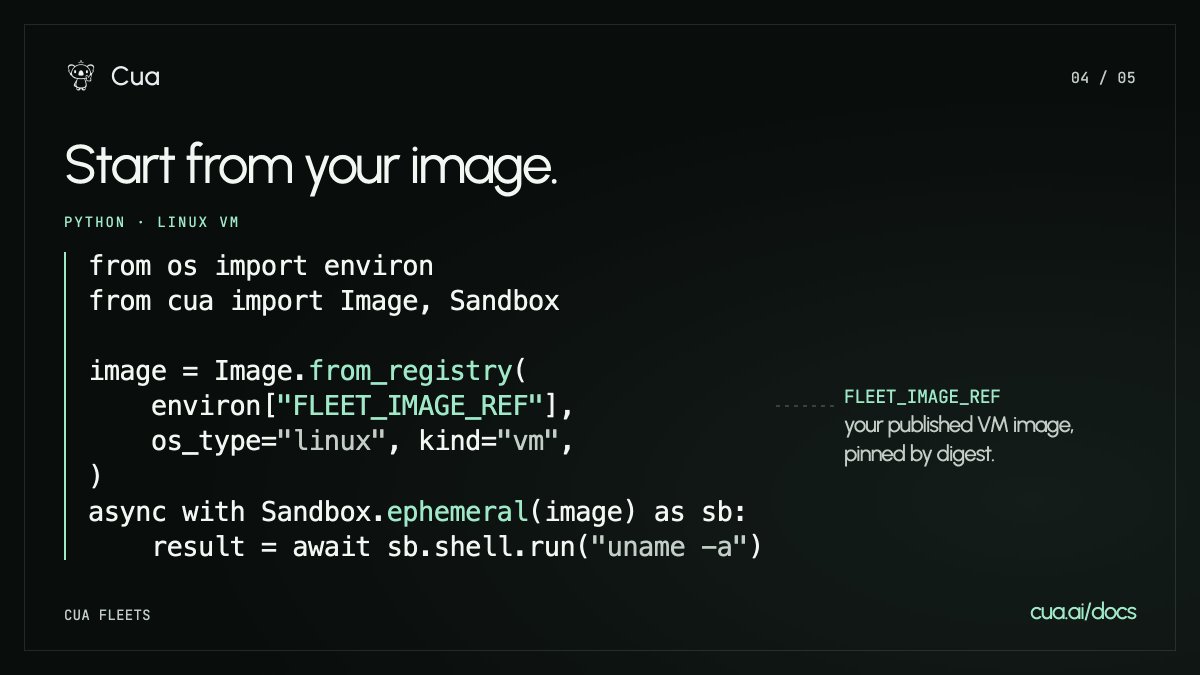
- Users choose the OS, install tools and configure startup services before Fleet boots anything, then package the bootable guest disk as an OCI/containerDisk artifact. Fleet only boots the published VM artifact, so the image pipeline is the user's own.
- Cua advises pinning the image by digest because a mutable tag can later point to a different image; changing the setup means publishing a new image.
- Images are referenced with Image.from_registry() and launched with .ephemeral(). The guide's default setup expects the image to start computer-server on port 8000.
Lets teams running computer-use agents standardize on pre-configured desktop images instead of provisioning tools on every sandbox boot.
Checking sign-in…
Loading comments…