MAI-Image-2.6 takes the image-editing crown from its own sibling
- Source
- x.com
- Date

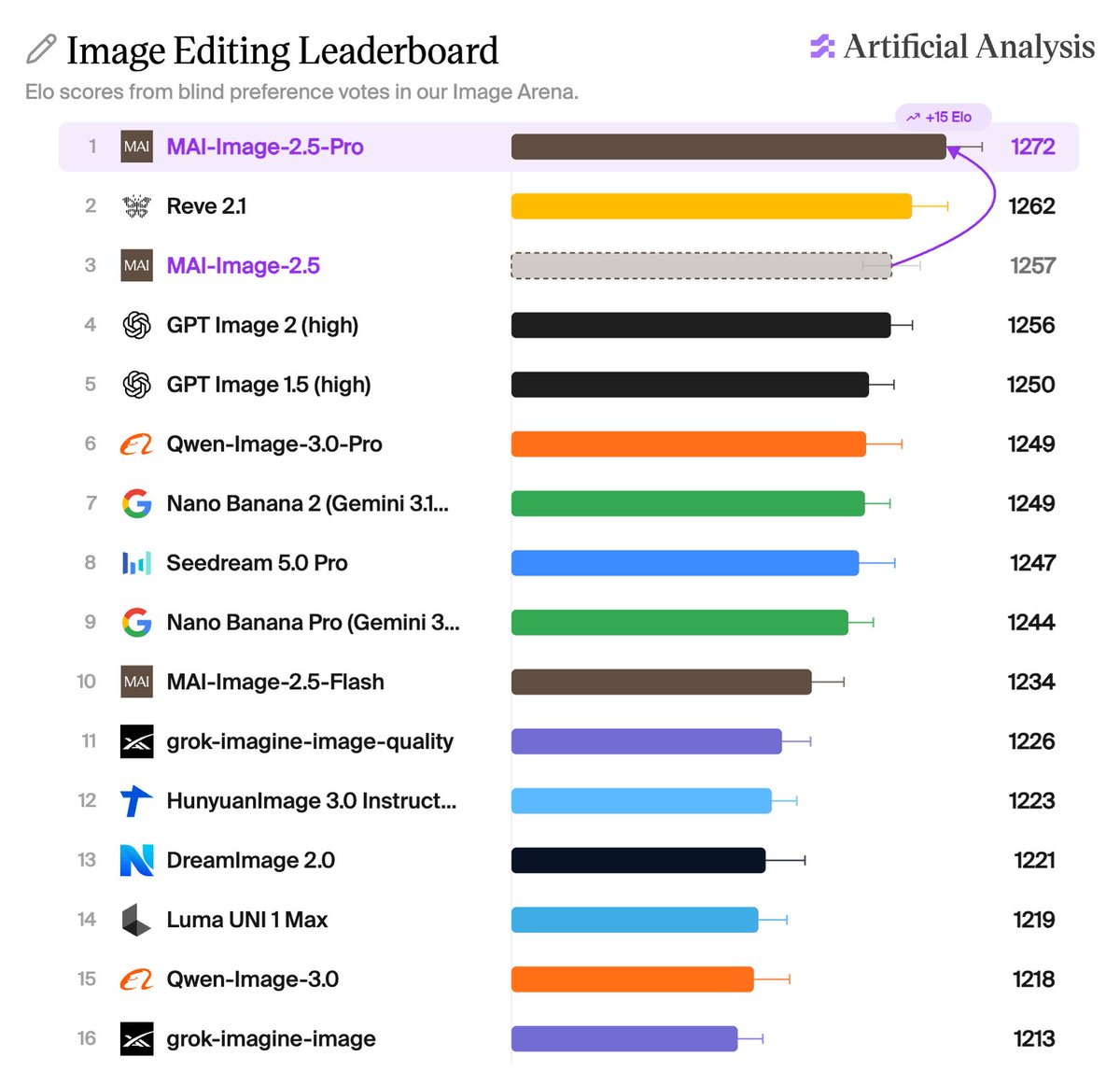
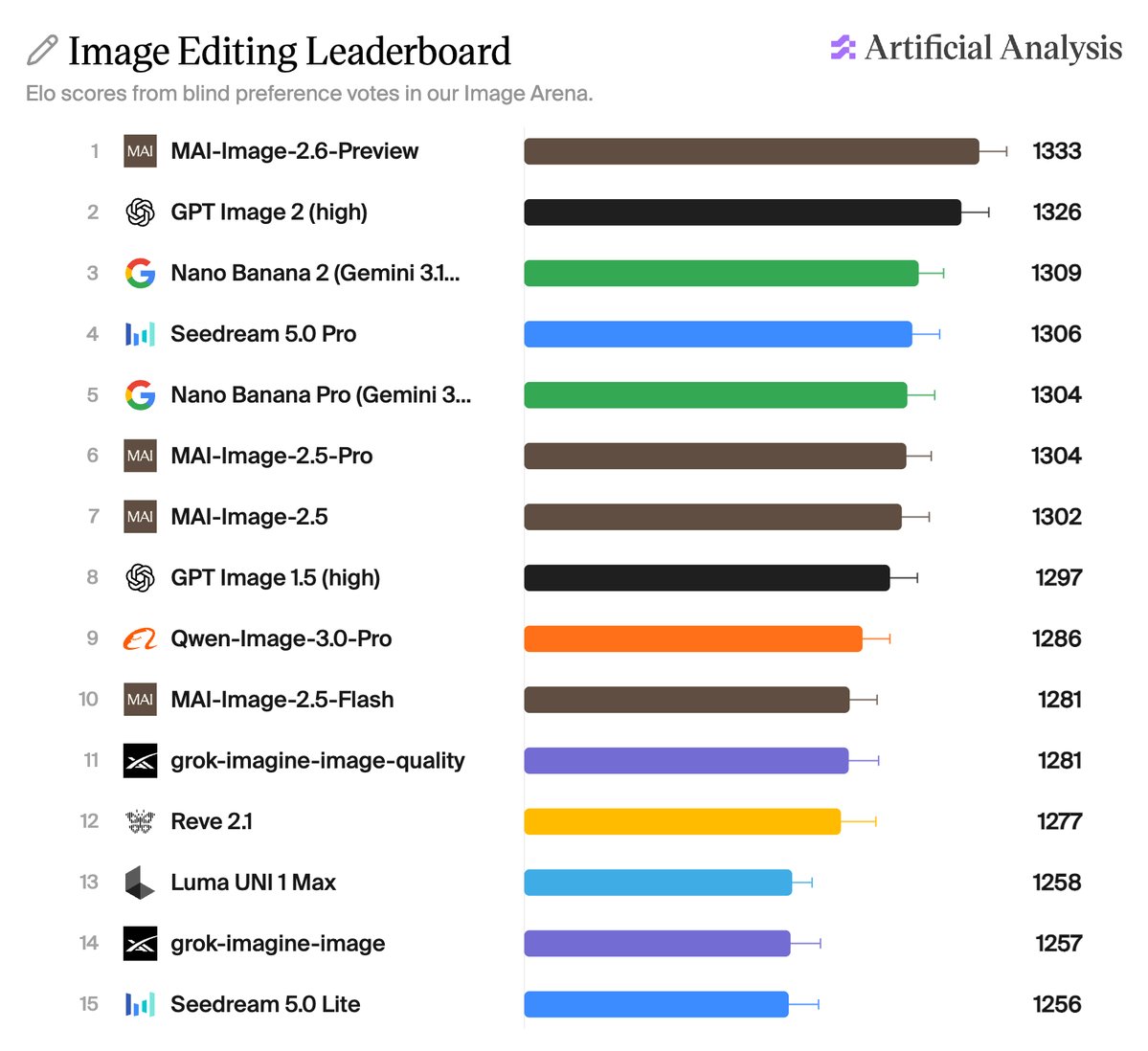
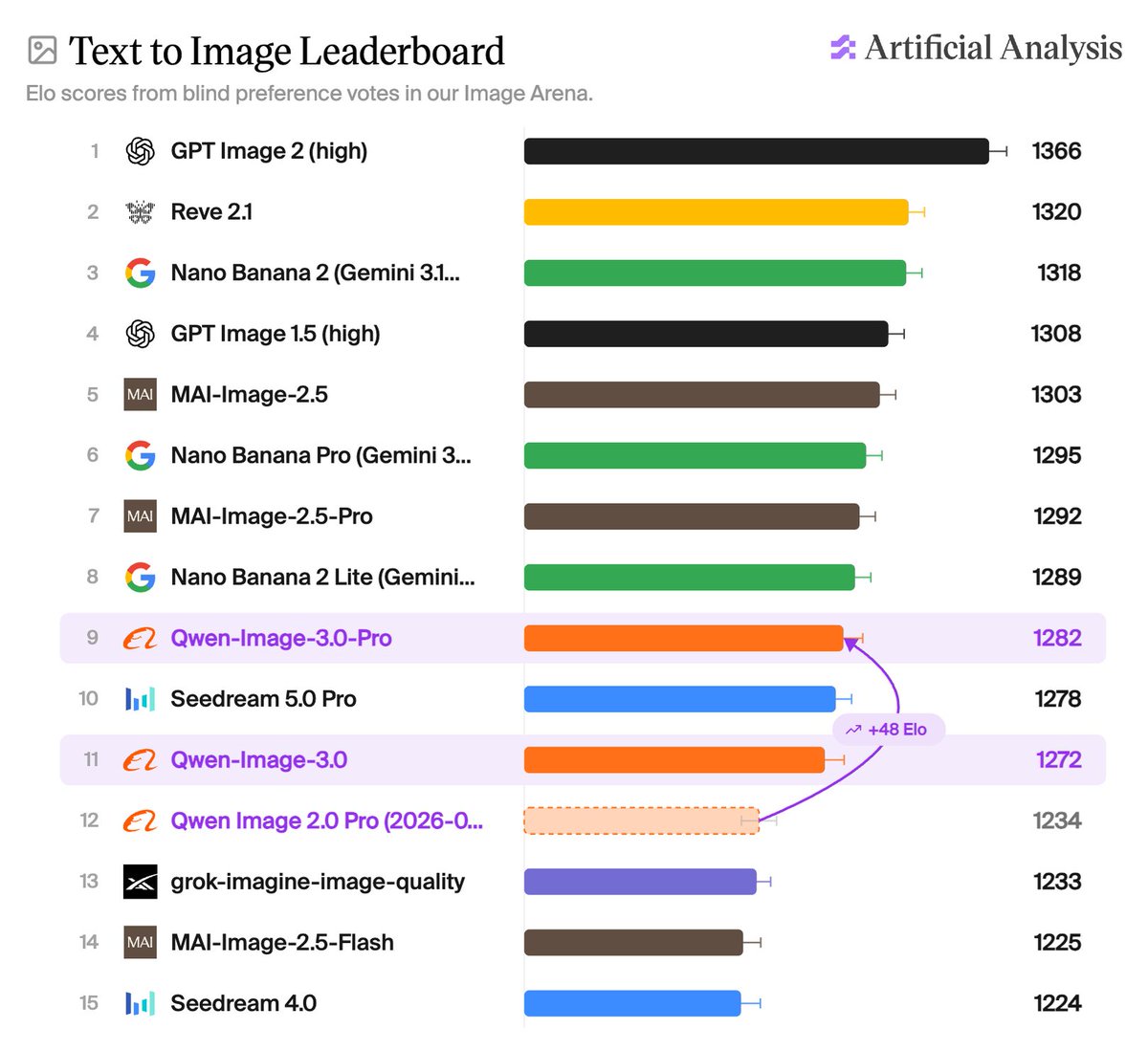
Microsoft's MAI-Image-2.6-Preview lands at #1 on the Artificial Analysis Image Editing Leaderboard and takes #2 in Text to Image MAI-Image-2.6 is the newest model in Microsoft AI's MAI-Image family, announced August 10. Microsoft highlights stronger text rendering, better portraits and 3D imagery, and more polished commercial and photorealistic outputs. Like the MAI-Image-2.5 family, it handles both text to image generation and image editing. In the Artificial Analysis Image Arena, MAI-Image-2.6-Preview debuts at #1 on the Image Editing Leaderboard, ahead of Microsoft's own MAI-Image-2.5-Pro, Reve 2.1, and OpenAI's GPT Image 2, and giving Microsoft the top two spots on the board. In Text to Image it takes #2, behind only OpenAI's GPT Image 2 and ahead of Reve 2.1. On our refreshed Text to Image taxonomy, MAI-Image-2.6-Preview takes the top spot on 5 of the 19 category leaderboards (Material, Knowledge, Frontier, Retail & Ecommerce, and Marketing & Advertising), ahead of GPT Image 2, which leads every other category. MAI-Image-2.6 extends a rapid run of strong image releases from Microsoft AI. MAI-Image-2.5 debuted at #2 in Text to Image in June. MAI-Image-2.5-Pro, launched July 23, took #1 in Image Editing when we published our results last week. MAI-Image-2.6 now takes that top spot from its own sibling, and sits at #2 in Text to Image against MAI-Image-2.5-Pro's #8. MAI-Image-2.6 is available in the MAI Playground and in Private Preview on Microsoft Foundry. Congratulations to @MicrosoftAI on the release! See below for our analysis of MAI-Image-2.6-Preview and other leading models in the Artificial Analysis Image Arena 🧵

MAI-Image-2.6-Preview is the new frontier model in 5 of the 19 categories of our refreshed Text to Image taxonomy. Our taxonomy scores 9 capabilities and 10 use cases, each with its own leaderboard. MAI-Image-2.6-Preview takes the top spot on: Material, Knowledge, Retail & Ecommerce, Marketing & Advertising, and Frontier. OpenAI's GPT Image 2 leads every other category.

In our model capability breakdown, MAI-Image-2.6-Preview does best in Materials and Knowledge. ➤ Lighting tests how light behaves: direction, falloff, catchlights, and shadow that matches the source. ➤ Knowledge tests whether real-world specifics come out right. Example Text to Image Prompt: Virtually staged listing photo of a loft living room in a converted textile mill. The shell stays as found: sandblasted brick walls, original maple floors with patched board sections and old machine-oil staining, a cast iron column wearing layers of chipped paint. The staged furniture should sit naturally in the room's light: a cognac leather recliner with a seat cushion creased and softened from years of use, the grain lightening across the arms, a loveseat in looped cream boucle wool, a slubby linen throw, and a flat-woven kilim in faded madder red under the group. Soft contact shadows grounding every piece on the maple. Steel-framed warehouse windows, overcast daylight, no people, no watermark.


These capabilities translate to MAI-Image-2.6-Preview’s leading performance in our Retail & Ecommerce and Marketing & Advertising use cases, where it tops both boards: 17 Elo ahead of GPT Image 2 (high) in Retail & Ecommerce, and 4 ahead in Marketing & Advertising. ➤ Marketing & Advertising covers campaign creative, where the concept, the copy, and the brand mark all have to land in one image. ➤ Retail & Ecommerce covers product imagery - packshots, on-model apparel, packaging mockups. Example Text to Image Prompt: 35mm film photo for a kite festival poster, a diamond kite directly overhead against the sun, ripstop nylon panels glowing translucent orange and teal, seams and spars showing as dark lines through the fabric, string cutting the frame. "Windward Weekend, May 9-10" along the bottom.


MAI-Image-2.6-Preview now leads image editing and sits second in text-to-image behind GPT Image 2, topping five of nineteen category boards — a concrete reason to re-test if your pipeline generates product or campaign imagery.
Checking sign-in…
Loading comments…